
2008-03-01 »
Well, that was quick
IOUCentral announces that it is the first peer-to-peer lending company in Canada and then is shut down by regulators about two weeks later.
Remember, nothing I say here speaks for my employer or its various (publicly-traded) parent/sister companies. But... regulators or not, this was an extremely fishy business to be in. Basically they specialize in helping little guys like you lend money to people so unlikely to pay it back that they can't get a normal bank loan. That's funny, I wonder why the banks won't lend those people money? Sigh.
(In contrast, microfinance, which does make sense, addresses a legitimate reason big banks won't lend money to poor people: they have too much fixed overhead per loan. But things like IOUCentral And Kiva increase overhead, they don't decrease it, so that's not a competitive advantage.)
2008-03-05 »
Smileys and typography
- Smileys that have been used in electronic mail for the last twenty years or
so find their way into print in two cases: in articles about smileys or in
moronic youth press.
-- Artemy Lebedev
It's a pretty funny article. Actually he likes smileys when they're punctuation marks, but not when they're graphics. It's quite interesting.
2008-03-10 »
Versaplex actually does something
garoth (one of our co-op students at Versabanq) writes that Veranda is now ready for human consumption. Veranda is a graphical database management front end for Versaplex. Now, he actually used the word "done," but I've long ago learned that that word doesn't apply to software. Especially once someone actually tries it out.
Versaplex is a still-sparsely-documented database "middleware" layer that basically lets you talk to your favourite SQL database engine over D-Bus. It will eventually provide various latency, parallelism, and API convenience advantages (since most databases have absolutely terrible protocols and client APIs).
You can visit versaplex at code.google.com. If you want to help out, join the versaplex mailing list.
Note: versaplex runs on Windows or Linux, but it currently only supports talking to a MS SQL database. We definitely want to fix that! Contributions are welcome.
2008-03-11 »
Canadian Wireless Auction
Everywhere you look, there's discussion of the wireless spectrum auction in the U.S., probably mostly because people have heard that Google's bidding, and Google = news.
Meanwhile, what about those frequencies in Canada? The FCC isn't applicable here, you know, so what we do is totally different. Well, it turns out that it's not so different: we had an auction here too. I hadn't heard of it until now, although apparently today is the last day to submit bids. Go figure.
I don't think Google is involved.
2008-03-19 »
A tale of five merges: cvs, svn, git, darcs, etc. (Part 1: CVS)
Recently I've been experimenting a lot with software version control (and other things) using git. One of the things that's different about git vs other systems is its concept(1) of branch merging.
Put simply, the result of merging two(2) branches should be a single branch which "contains all the changes from both branches." But that definition is overly simplistic. Every version control system can do that much. The really interesting questions are (A) how automatic is it, (B) what happens to the change history, (C) what happens when you merge back and forth multiple times between two(2) branches, and (D) what happens when you "cherry pick" individual changes, usually bugfixes, from one branch to another.
Let me take you on a tour of some different merging systems to see how they differ in approaching those four questions. I won't try to say which is better, because I'm still trying to figure that out for myself :) Think of this as just a technology overview.
Today I'll tell you about CVS, which I used for years. It's completely obsolete now (at the very least you should use Subversion, which has a strict superset of CVS's features), but it's instructional, because to do branching and merging in CVS, you really have to understand what you're doing. This understanding will come in handy when we discuss the other systems later.
CVS merging
Despite what you may have heard, CVS has perfectly good support for merging changes between branches, and even for bi-directional merges back and forth between branches. People who claim that CVS cannot do these things are simply boneheads.(3)
"But!" you say. "But CVS doesn't even have a merge command! How can it possibly claim to support merging?" If you say this, then you, too, are a bonehead. CVS doesn't have a command called "merge", but it does have "cvs up -j", the description (from "cvs --help up") of which is "Merge in changes made between current revision and rev."
"But!" you interrupt again. "But CVS doesn't even have atomic commits! How can you be sure what you've merged?" This is true, but if you think this actually matters, there are some things you don't know. Remember, CVS locks the entire repository during a commit, so commits are "atomic" in that sense. What people say when they say CVS doesn't have "atomic commits" is actually that each file has its own history (and revision numbers!), so sometimes it's hard to tell which files were involved in a particular checkin. That's very true, and it's annoying, but it has no impact on our ability to do branching and merging. Why? Because CVS has perfectly good tagging. You can tag every file in your checked-out repository at a particular time, and that tag will end up only in the exact revisions that you had checked out at that time. A CVS tag is a perfectly reliable marker of repository state as it existed at a particular point in time.(4)
The upshot of all this is that if you're going to do merges with CVS, you do it by using the little-known "cvs up -j BEFORE -j AFTER" command, where BEFORE and AFTER are tags.
Ah, but which tags should you use for BEFORE and AFTER? Well, the tag you created BEFORE you made your changes, and the tag you created AFTER you made your changes, respectively. "cvs up -j -j" merges all the changes from BEFORE to AFTER into the branch you currently have checked out. Then you fix your conflicts and check in the merged branch.
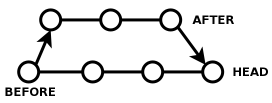
Note that when you've done this, you still have two branches, which I'll call AFTER and HEAD. HEAD contains all the changes from the branch you were originally on, plus the changes between BEFORE and AFTER. AFTER just contains the changes from BEFORE to AFTER, but nothing else that has been happening in HEAD.
CVS multiple merges
So what if work continues on the AFTER branch and you want to merge those changes into HEAD? Oh no, "cvs up -j BEFORE -j AFTER" won't work, because it'll try to merge some of the same changes as last time, and cause a zillion conflicts!
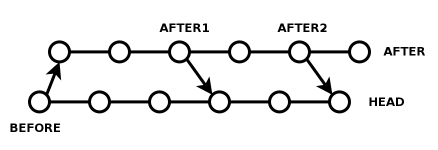
Well, don't do that then. Instead, keep your old AFTER tag and call it AFTER1. Check in more stuff to the AFTER branch, and when you're ready to merge, call it AFTER2. Then just do "cvs up -j AFTER1 -j AFTER2". No conflicts. It's easy, once you get the hang of it.
CVS bidirectional merges
"Aha," you say. "I've got you now! But what if I want to then merge the changes in HEAD back into my AFTER branch, then continue working on my AFTER branch, and then merge my AFTER changes back into HEAD? Bwahaha!"
This sounds complicated enough to make your head spin, but actually it's not hard at all once you understand it.
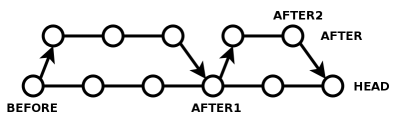
The critical realization is: merging all the changes from HEAD into AFTER, and merging all the changes from AFTER into HEAD, is a trick question. Actually, both operations are the same. The merge you did above has produced an AFTER+HEAD combined branch, so if that's what you want, just make a tag called AFTER1 pointing to HEAD, point your AFTER branch at AFTER1, and keep working in AFTER. Next time you need to merge in one direction or the other, AFTER1 is always the starting branch. You either do "cvs up -j AFTER1 -j AFTER2" in HEAD, or you do "cvs up -j AFTER1 -j HEAD" in AFTER2. In both cases, you don't get any unnecessary conflicts.
I know, your head is probably spinning at this point, but relax. At the very least, the only commands you had to learn were "cvs tag" and "cvs up". And CVS is totally obsolete right now, so you'll never have to do this yourself. CVS-style tagging merging is just interesting because it's the basis for everything else.(5)
To summarize, all merging in CVS is a simple matter of these steps:
- Tag the branchpoint (the point where two branches diverge) as BEFORE.
- Make changes.
- Make a tag called AFTER after your changes.
- Check out the destination branch called HEAD.
- Merge your changes into the destination with "cvs up -j BEFORE -j AFTER".
- Repeat as necessary.
CVS overall
Okay, now we're ready to quickly answer our original questions.
CVS: (A) is not very automatic at all, and slow and error prone to boot; (B) makes it really hard to get change history except on the HEAD branch, so you have to track it all by hand; (C) supports back-and-forth merges with no more trouble than single merges; and (D) has terrible support for cherry picking since you probably didn't bother to make a tag for every single checkin, and without tags, CVS merging is impossible.
Next time: merging in Subversion.
Footnotes
(1) Note that I'm not talking about merge algorithms here. Discussions about that tend to lead to flamewars, but aren't really the important part. Everyone intuitively agrees what the outcome of branch merging should be. The flamewars are never about the outcome, they're about the algorithm used to achieve that outcome.
(2) Git happens to be able to merge two or more branches at once, but that's a straightforward extension of the merging concept. Let's just talk about two of them for simplicity.
(3) Here is my argument that CVS and SVN can happily do bi-directional merges: I've done it repeatedly in production settings with dozens of developers, therefore it is possible. QED. Now, you go try to prove that it can't be done. Come back when your argument is more convincing than mine. Thank you.
(4) Note that a subversion "revision number" is functionally exactly equivalent to a cvs tag, except that it doesn't have a human-readable name, it gets created automatically with every checkin, and subversion creates tags in O(1) time while CVS does not.
(5) Yes, even (gasp!) git. But don't tell Linus.
Update 2008/03/20: Some people just complain when your article is too complicated. But cpirate sends you diagrams (which I have now inserted above). Thanks, Peter!
2008-03-21 »
A tale of five merges, part 2: Subversion (svn)
Last time, I introduced the confusing but definitely workable concept of merging branches with CVS.
Of course, CVS is completely obsolete nowadays, having been wholeheartedly replaced by Subversion. SVN really does do everything CVS can do, plus more, and it includes awesome CVS import tools and clients for every platform, so if you're still using CVS, do yourself a favour and just switch to SVN right away. I mean it.(1)
As a refresher, the questions we're investigating for each merging system are: (A) how automatic is it, (B) what happens to the change history, (C) what happens when you merge back and forth multiple times between two branches, and (D) what happens when you "cherry pick" individual changes, usually bugfixes, from one branch to another.
Merging with 'svn merge'
If you understood what I said about CVS last time, it won't take you much work to understand merging in SVN. The key things to note are: - SVN numbers each commit automatically, and uses its commit numbers like CVS uses tags. - SVN tags, conversely, are almost nothing like CVS tags. (They're conceptually more like making new repositories altogether.) - 'svn merge' is essentially the same thing as 'cvs up -j -j', only with more annoying syntax.
I won't go into much detail here, as conceptually, merging in SVN is pretty much the same thing as merging in CVS, and is covered excellently in the SVN Book.
The strangest thing about merging with SVN is that even though SVN supports tags, they are mostly worthless for merging purposes. Instead, people use svn "tags" as branches and just merge based on revision ids. Where in CVS you would "cvs up -j BEFORE -j AFTER", you would now "svn merge -rBEFORE:AFTER that_other_repository", where BEFORE and AFTER are magic numbers and that_other_repository is the place in SVN where you've been working on your branch.(2)
As with CVS, repeated merging and bidirectional merging are both entirely possible, as long as you remember which revision numbers correspond to BEFORE and AFTER. Usually you do this by putting the revision numbers (by hand) into your commit messages, which is gross, but I guess no more gross than manually creating tags in CVS.
Merging with 'svnmerge'
'svnmerge' is a standalone program that is not officially part of svn. It is not to be confused with 'svn merge' (above), which is a command built into svn itself.
The purpose of 'svnmerge' is to get rid of the grossest parts of SVN merging, namely the fact that humans have to remember and type SVN revision numbers to do a merge, as well as repeatedly type the stupid that_other_repository path.
Simple advice: If you're using SVN, you should probably be using svnmerge for your merges.(3)
Unfortunately, one thing that svnmerge doesn't do easily is bidirectional merging. If you're working in a feature branch and occasionally merging into your branch from /trunk (the same thing as HEAD in CVS), you can use svnmerge to do it. But when you go to merge your feature branch back into /trunk, svnmerge will get horribly confused, and you'll have to do it using plain 'svn merge'. It's not the end of the world, but you have to know what you're doing.
On the other hand, svnmerge adds support for "cherry picking", or choosing to merge individual revisions from one branch into another. You can use this to backport bugfixes from /trunk into a patch release, for example. (Rumour has it that the SVN developers themselves use this technique a lot.)
How the SVN changelog tracks merges
SVN has what is called a "linearized" view of history. Every repository has a sequence of checkins, and each checkin affects one or more branches. So you can view the changes to a particular branch over time (by showing the sequence of checkins, and filtering out the ones that didn't affect your branch). You can also view the list of all the checkins, regardless of branch, and see a linear history of "what people did over time."
Perfect, right?
Well, not quite. The problem is that merge history isn't very easy to view. If you view the history of a branch, one of the checkins you see will be something like "merged changes from /branches/whatever, r3456:3573". If you're smart and use the 'svnmerge' tool, the changelog of r3456:3573, filtered for /branches/whatever, will be appended to the message. But if you want to know exactly what happened in r3458, then what happened in r3504, and then what happened in r3573... you'll have to ask about those revisions on /branches/whatever, not on your destination branch. And the only way you know that is by reading the freeform English message in the changelog. That's subversion's "linearized view" in action: as far as SVN is concerned, that branch just saw one checkin, the merge checkin. All those other details happened on some other, totally unrelated branch.
This is actually both good and bad, because it turns out that sometimes you want the detailed history, and sometimes you want the summary version.
For example, say I'm adding feature X in a branch called /branches/featureX. It takes me 57 commits, including a few merges to catch up with /trunk, before my changes are ready to go back into /trunk. Everyone else working on the project will be very interested to know that I "Merged /branches/featureX into the trunk" - as well as the precise set of changes that introduced - but they almost certainly don't care about my 57 commits in detail. For most humans, the preferred view of the trunk is SVN's linearized view.
That is, until it's time to track down which of those commits introduced a bug, or which lines of code were contributed by that guy who was copying source code from SCO, or who I should ask about this particular new function, or whatever. In SVN, you can do "svn annotate" to find out which revision a line was last modified in, and who did it... but it almost always turns out to have been modified by some guy who merged the changes from some branch, so you have to manually go look in that branch, and so on.
Next time, when we talk about git, we'll see how the opposite solution is bad for the opposite reasons.
SVN overall
Let's answer our original questions.
SVN: (A) is not very automatic at merges, albeit better than CVS, and 'svnmerge' makes it significantly better; (B) retains change history across all branches, but the detailed history of a merge must be traced manually to its source branch; (C) like CVS, supports back-and-forth merges with no more trouble than single merges; and (D) has okay support for cherry picking if you use 'svnmerge --bidirectional' carefully.
Next time: how 'git merge' works.
Footnotes
(1) Or switch to git, which someday will probably be the worldwide successor to svn. The road there is much bumpier, though, as git is much more confusing than SVN and does not (yet?) have a strict superset of SVN's features (it has some new things, but is missing some old things). I'll get to that later in this series.
(2) Ironically, that_other_repository must actually be just another path in your current repository, even though SVN forces you to specify the whole @#$#$ URL every single time. This wouldn't be so insulting except that I can't think of any good reason why it has to be in the same repository; the SVN merge algorithm should work just fine if the changes exist in some totally different SVN repository, and even the command-line syntax is designed to permit this.
(3) Rumour has it that Subversion 1.5, when it's released, will integrate svnmerge-style functionality into the main subversion system, as well as improving "svn log" and hopefully "svn annotate" so they can trace back through merges.
2008-03-23 »
A tale of five merges, part 3: 'git merge'
In the last two articles from this series, I talked about merging branches in CVS and SVN, and how they're largely the same.
Today is the first of two articles about merging in git. git is most definitely not the same as CVS and SVN.
Remember, the questions we're investigating for each merging system are: (A) how automatic is it, (B) what happens to the change history, (C) what happens when you merge back and forth multiple times between two branches, and (D) what happens when you "cherry pick" individual changes, usually bugfixes, from one branch to another.
Merging with 'git merge'
Compared to working with CVS or SVN, merging branches in git feels like magic. First, you check out the branch that you want to merge into, say MASTER. Then you type "git merge BRANCH", where BRANCH is the name of the branch you want to merge from. And that's all.
...When it works.
Aha. You see, "git merge" is really just doing exactly what you were doing in CVS or SVN by hand. That's why I went into CVS merging in such detail before.
Here's what really happens: given the name BRANCH and the implicit name MASTER (since that's the one you have checked out), git traces back in the history of both until it finds the branchpoint, that is, the last commit before the two diverged in the first place.(1) If we were using CVS, we'd call that point BEFORE, and BRANCH would be called AFTER. git then simply takes all the changes from BEFORE to AFTER and adds them to MASTER.
Now here's where things get especially clever. Remember when we were discussing bidirectional merges in CVS, and I pointed out that merging all the changes from BEFORE to AFTER into HEAD was the same as merging all the changes from BEFORE to HEAD into AFTER? The resulting tree is the same in both cases, but of course, in CVS and SVN, the actual commit you make is different in each case. After all, in one case, you're committing to the HEAD branch, and in another, you're committing to the AFTER branch.
git is smarter than that. In git, there really is no difference between the two operations. You generate a single commit that has two parents: AFTER and HEAD (or BRANCH and MASTER). Now, it so happens that git updates the MASTER branch pointer to point at your new commit in one case, or the BRANCH branch pointer in the other case, but the commit itself is exactly the same in both cases.
And that simple fact is why repeated merges and bidirectional merges work. Next time you're merging MASTER and BRANCH, git will trace back, and the most recent checkin that is shared between the two branches will be one of the parents of that magical two-parent merge checkin. We use that one as BEFORE, and merge the changes from BEFORE to BRANCH into MASTER. Or else we merge the changes from BEFORE to MASTER into BRANCH; again, it's the same thing.
This concept of a two-parented commit is what makes git merging totally different from SVN, and it's the difference between SVN's "linearized history" (in which every commit has exactly one parent, even if we made it that way artificially) and git's non-linear history.(2) It's also the reason git merging can be automatic, while svn's cannot.
Why it doesn't always work
The problem with git's automatic merging is, well, that it's automatic. When it's working for you, it's amazingly powerful. But people who are used to CVS or SVN merging sometimes feel like git is taking their power away.
For example, perhaps you don't want to merge all the changes from BRANCH; perhaps you only want the changes up until sometime last week. With 'svnmerge' this is easy enough to do, but with git it requires multiple steps, since git-merge won't accept arbitrary revisions on its command line, only branch names.(4)
Or say you create BRANCH1 from MASTER, and start to add feature #1. Then you create BRANCH2 from BRANCH1, and add (unrelated) feature #2. Now you decide that feature #2 is ready to merge back into MASTER, but feature #1 is not. No problem, right? You checkout MASTER and then type "git merge BRANCH2".
Oops! git has just merged all the history of BRANCH1 and BRANCH2 back into MASTER, which is not what you wanted at all! Unfortunately, because git's merging is fully automatic, there is no easy way to get the behaviour you wanted.(3) With CVS, on the other hand, what you would do is obvious: "cvs up -j BRANCH1 -j BRANCH2", to merge all the changes from BRANCH1 to BRANCH2 into MASTER. With SVN, it would be similar, except that BRANCH1 and BRANCH2 involve revision numbers and URLs.
In git, the solution to this sort of problem is to use the "git rebase" command, which we'll discuss in more detail next time. But any use of git-rebase or git-filter-branch, both of which are very useful, fundamentally change the commit IDs on the modified branch. "git push" and "git pull" stop working as expected. Essentially, these commands generate entirely new commits for the part of the tree they change, so now there are two sets of commits in your repository that do the same thing in two different ways, with nothing tying them together. Worse, after a rebase, the point where your two branches diverged might be no longer known to git - they no longer have a single commit id in common - so it just gives up.(5) And trying to merge the new MASTER back into the original BRANCH2 later will result in a ton of conflicts.
The really bad news is that git-svn, which is otherwise a great tool to help with migrating between git and svn, uses git-rebase pretty heavily. That confuses git's automated merging features altogether, and git's manual merging features are not as straightforward as SVN's, so things get confusing very fast.
Git merge and cherry picking
git includes another command called "git cherry-pick". Its job is to take the changes from one specific commit and apply them to the current branch.
Unfortunately, the existence of git cherry-pick is incompatible with git merge's view of the world. git's history may not be linear, but at least it's continuous: branches may swerve into and out of each other as they pass through time, but individual changes aren't supposed to simply jump from the middle of one tree into the middle of another.
Since there's no way to represent what really happened, a cherry-picked patch instead produces an entirely new commit with exactly one parent (the destination branch), so a future git-merge from that branch has no idea the patch already existed, and usually produces a conflict.
Cherry picking in SVN with 'svnmerge' definitely works better than this.
How the git changelog tracks merges
Last time around, I talked about how SVN's "linear" change history tracks merges, which is simple enough: every time you do a merge, it puts a single checkin into the destination branch which contains all the changes. And if you want to know the details of every patch from the source branch, well, you'll have to go look at the source branch yourself.
git definitely doesn't do that. Instead, if you ask for "git log" it will show you the complete set of changes in all branches leading up to the current commit. That is, all of the checkins to either of the merged branches show up in the log, with nothing in particular in the "git log" output identifying which patch came from where.(6) This is technically correct, but is not actually what most users wanted to know.
Most people who ask for the history of the MASTER branch want to know the "simplified" form of its history: Added feature X; added feature Y; fixed feature X; added feature Z. But instead, they confusingly see all the individual 57 commits making up "added feature X", even though if they were ignoring your featureX branch all along, "added feature X" was really a one-time event for them.(7)
A related problem is that git doesn't have a way of naming branches globally. So if you merge from the "featureX" branch, you're not really merging from featureX; you're merging from 2bed2ad4845eceb8ee650f34e476a60f9fbecc7c. As far as the computer is concerned, that's the same thing, but when it comes to tracing back through your history, it's not actually what you wanted to know.
Worse still, git doesn't remember at branch time where you diverged; it only figures it out at merge time. That means there is no equivalent to SVN's "svn log --stop-on-copy", which shows only the changes you added in this branch.(8)
git-merge overall
Now let's go back to the questions we were trying to answer in the first place:
git-merge: (A) does merges fully automatically, when it works, but complicates manual merges; (B) retains the history of each change, but that often turns out to be more than you wanted; (C) easily supports back-and-forth merges with no more trouble than single merges; and (D) does not really support cherry picking without introducing future merge conflicts.
Phew!
Next time: how 'git rebase' tries to solve some of the things people don't like about git merge.
Footnotes
(1) This is actually greatly oversimplified. Since git history is nonlinear, just tracing back through it is a bit complicated. On top of that, you can play tricks with selecting different branchpoints for different files, and so on.
(2) I guess if SVN's history is "linear", then git's history is "helix shaped," with endless splitting and remerging of histories.
(3) git proponents would say that what you should have done is branched BRANCH2 from MASTER in the first place. But not everyone is lucky enough to get everything right the first time.
(4) There seems to be no actual reason for this restriction. Perhaps it will go away eventually.
(5) That's the source of the mysterious note that "You should understand the implications of using git rebase on a repository that you share" in the git-rebase man page. Of course, the man page doesn't really tell you what the implications are. It just says it "will cause problems."
(6) The "gitk" and "gitweb" programs attempt to represent this graphically, which helps. The "git show-branch" program is also somewhat useful here. But all of these are much harder to understand than "svn log".
(7) There is actually a "--squash" feature of git-merge that tries to resolve this problem. Essentially it creates an entirely new commit with only one parent - the destination branch - and doesn't tie in at all to the history of the other branch. In other words, it does exactly what "svn merge" would do, but that has exactly the opposite set of tradeoffs, as discussed last time, and makes bidirectional merges very ugly. Alternatively, "git log --first-parent" displays only the first parent of each merge, which is closer to what most users actually want.
(8) If you manually keep track of which branch you came from, you can use "git log BEFORE..MYBRANCH" to see the list of changes between BEFORE and MYBRANCH. But if you're going to manually keep track of BEFORE, you might as well be using CVS. "git show-branch" also attempts to help here, but if you ever use "git rebase" its output will be hopelessly cluttered and confusing.
2008-03-25 »
A tale of five merges, part 4: 'git rebase'
So far, we've talked about branch merging concepts in CVS, SVN, and git. Of the three, git's is by far the most convenient and magical... when it does what you want. When it doesn't do what you want, you find yourself in a bit of trouble.
Rebasing git branches
Last time, we brought up one example of a major problem with the "git merge" command: if you create BRANCH1 from MASTER, and then BRANCH2 from BRANCH1, and you merge BRANCH2 into MASTER, then you end up merging BRANCH1 into MASTER as well by accident. That's because "git merge" finds the first common ancestor of BRANCH2 and MASTER, which is MASTER, and merges all the changes from there to BRANCH2. In between those two points lies all of BRANCH1.
This is exactly the problem that "git rebase" was designed to solve. Here's what you do:
- git checkout BRANCH2
- git rebase --onto MASTER BRANCH1
What the above command does is re-apply all the changes from BRANCH1 to BRANCH2 onto MASTER. Sound familiar? Yes, that's right, it's exactly what "cvs up -j BRANCH1 -j BRANCH2" would have done. And with "git rebase", you specify revisions just as manually as you would with CVS or SVN.(1)
Here's the problem: the rebase command generates entirely new patches onto an entirely new branch. The old BRANCH2 is gone(2), and the new BRANCH2 has a bunch of commits on it that look similar to a person, but as far as git knows, have nothing in common with the old ones. If you've ever shared your old BRANCH2 with anyone, they will no longer be able to merge to and from your new BRANCH2. If you use git-rebase, the only sane thing you can do is throw away all the pre-rebase versions of BRANCH2... and that's tricky, since people all over the world might have a copy. They might even have merged it with their own branches. Oops.
This combination of inconveniences, by the way, is the absolute most frustrating problem with using git-svn. Every time a new revision comes in from SVN, you need to git-rebase your patches on top of it, screwing up all git branches in the entire repository.
The good news is that you can continue to work on your new BRANCH2, and when you merge it (with "git merge") back and forth with MASTER, at least you won't have a problem.
Interactive Rebase
Another concern that people run into with git's merging style is more about their sense of aesthetics. git makes it really easy to create local branches and check in frequently - it even encourages this, since it has such easy merging and branching and such fast checkins.
The problem is if you take advantage of this, you end up checking in code every ten minutes, and sometimes it doesn't work. When you later want to prepare a set of patches for submission to an upstream maintainer, you don't want to send in 57 patches, none of which work independently. You probably want to send maybe three patches, each of which adds a separate feature.
For this, git introduces "git rebase -i", known as "interactive rebase." I won't go into detail, since the git-rebase man page is detailed enough. But the idea is that you can take your original patchset and shuffle it around and split and join patches however you want, making it look like that's what actually happened as you developed your project. So if you added feature #1, then feature #2, then realized there was a bug in feature #1 and fixed it, then fixed another bug in feature #2, you can join patches #1 and 3, and then #2 and 4, so it looks to the world like you just did everything perfectly the first time. As a bonus, when people are doing code reviews of your patches, they won't have to review code that you already knew was broken. That ought to save some time.
Interactive rebase is an innovative feature that certainly isn't available in something like CVS or SVN, and it can be addictive. Of course, before you have it, it's hard to imagine that you'd need it. Personally, I find myself reshuffling my patches a bit unnecessarily just for the aesthetics of a clean repository where each patch does what it says. This is both fun and time consuming, and it's debatable whether it's worth it or not.
To some degree, the reason interactive rebase is popular is that "git merge" history is too detailed. In svn, you'd make your mess on a branch, get things all cleaned up, and then do a one-shot merge from your branch into the trunk. The merge would just say "added features X and Y." Nobody was forced to look at the inevitable long string of screw-ups that actually led to features X and Y getting added. Interactive rebase exists primarily to get back the feeling of cleanliness that SVN had and git took away.
Git rebase summary
For each merging system, we've been asking: (A) how automatic is it, (B) what happens to the change history, (C) what happens when you merge back and forth multiple times between two branches, and (D) what happens when you "cherry pick" individual changes, usually bugfixes, from one branch to another.
"git rebase" is unusual for a merging system, but it's basically a paraphrased version of old-style CVS and SVN merge commands. Thus, the answers it gives to these questions are roughly the same: (A) it's semi-automatic, as long as you provide the right revision numbers; (B) it's mostly used to make the change history look cleaner, at the expense of losing the detailed history git-merge could provide; (C) it actively complicates merging back and forth between branches, and produces more conflicts than CVS or SVN would have; and (D) it's highly compatible with patch cherry picking, since that's pretty much all it does.
In short, a combination of "git merge" and "git rebase" either gives you the best of both worlds, or the worst of both worlds, depending on your point of view. But having to choose between them, and trying to figure out what crazy thing happened when you chose the wrong one, is one of the scariest and most confusing parts of git as far as new users are concerned. In fact, for me, it's much harder to sort out the combination of "git merge" and "git rebase" than it is to figure out two-way merging in CVS... and that's saying a lot.
Next time: darcs and patch theory.
Footnotes
(1) One cool thing about "git rebase", however, is that it keeps your original patches as separate checkins. With CVS or SVN, you would get one big checkin with a merge of all your patches; with "git rebase", it keeps your patch series intact. There is no technical reason that CVS or SVN couldn't do the same trick, though.
(2) Usually you don't want to actually delete the old BRANCH2, just in case you screw up. Perhaps you'll call the new one BRANCH2a. But you'll still never be able to merge between BRANCH2 and BRANCH2a, even though they contain the same set of changes.
2008-03-27 »
A tale of five merges, part 5: darcs and patch theory
This is not really an article about darcs. Actually, I've never used darcs. It's not even really about patch theory, because I'm too lazy to read through the actual article on patch theory in enough detail.
What this really is is a nice way to finish off my series of articles on version control and merging concepts, by discussing some features that a program like darcs might or might not have, because of some theory that patch theory might or might not provide. In other words, here are some good ideas of unknown origin that I hope git will steal. But I'll call our imaginary system that might have these features darcs, because it ought to have a name. My apologies to the actual darcs maintainers.
So far, we've talked about branch merging in CVS, SVN, and git, both with git-merge and git-rebase. We've been addressing each one in terms of four main questions: (A) how automatic is it, (B) what happens to the change history, (C) what happens when you merge back and forth multiple times between two branches, and (D) what happens when you "cherry pick" individual changes, usually bugfixes, from one branch to another.
What we find is that with all the systems discussed so far, most of these answers end up being some kind of compromise. None of the options presented so far has really been entirely what we want. So what would the ideal solution be like?
A note on versioned storage
Before we can talk about the world of perfect version merging, we have to talk about how those versions are stored in the first place. There are two basic philosophies about that: (a) store the files, or (b) store the patches.
Speaking very roughly and inaccurately, SVN and CVS store one version and then a bunch of patches against that version. git stores just stores the files.(1) Systems like darcs, on the other hand, prefer to talk about groups of patches, rather than the files themselves.
The results of these philosophical decisions are very interesting. For example, if you branch and merge a lot in SVN, your repository gets a lot bigger, because you store the patches from A to B, and from B to C, and from A to A', and from B to B', and from C to C', and so on. All those patches will be slightly different, even if the resulting files are mostly the same, so it's impossible to eliminate any redundancy (except trivially with something like gzip). git, on the other hand, stores just the files, and when files are the same (which is very frequently), it doesn't store them over again. That means that in git, branching is basically always free.
darcs, on the third hand, mostly stores each version as a big pile of patches, and it stores them in a particularly efficient way: if it is possible to use the patch from A to A' to convert from B to B', even if the patch application is a bit "fuzzy", then we just add that patch to the pile for B'. Similarly if it will work to convert C to C'. So in darcs, branches are about as cheap as in git.
Now, regardless of which storage method you choose, you can obviously convert quite easily from files to patches and back. Version control systems do this all the time; if you do "git show" or "git diff", it's converting from files to patches; if you do "svn checkout", it's converting from patches to files. The only difference is that certain operations go faster than others depending on your storage format.
Why git is so fast
For example, "git clone" (the equivalent of "svn checkout") goes much faster than checking out of any of the other systems, because no conversion is necessary. On the other hand, "git diff" might be faster or slower than a diff on one of the other systems; if you're asking about a patch that darcs has already stored, darcs will probably be faster, because git has to generate a patch. But if you're asking about the difference between two arbitrary sets of files, darcs will first have to figure out what those files look like, then generate the patch, which is two steps to git's one, so git will be faster.
And this is where the fun starts. Because of git's storage system, some operations are just plain amazingly fast: such as creating a commit. The secret to git's speed is that making a checkin just involves copying the changed files verbatim into the repository; it doesn't think about deltas, or patches, or anything. And checking out any version, or creating a branch, involves simply copying a file directly out of the repository. Even finding the differences between any two versions simply requires reading the index to see which files have different SHA-1 hashes, and doing a diff between them. And the "git merge" operation does exactly that: it figures out the differences from BEFORE to AFTER, and applies them to TARGET, and checks in the result. All of these operations are about as fast as they get.
Where git gets slow is exactly where darcs gets fast. In darcs, every merge is like a "batch cherry picking" operation in git. When there are no patch conflicts - and darcs' "patch theory" will tell you in advance if there's a conflict - then darcs can cherry pick a batch of patches in the same time it takes for git to make an empty commit. For git, on the other hand, every single cherry you pick takes the same time as a git-merge: checkout, diff, patch, and checkin.
git-rebase is just a big batch of cherry picking, and it's slow in git. It would be a non-event in darcs.
git-svn uses git-rebase extensively, because it pulls patches out of svn and then rebases all your work on top of it. In darcs, the patches would just go straight into the repository, no questions asked, and the conflicts could be resolved later.
But much more importantly than the speed, cherry picking patches (and thus "rebasing" branches) in darcs retains the history of those patches; after all, they're just the same patches in another place, and all there is is patches. Where history in SVN is a line, and history in git is a helix, history in darcs... well, we don't like to talk about "history" in darcs. We talk about... Patch Commutation and Inverses.(2) Erm, okay, maybe another time.
The major difference in the way darcs thinks about these things is in what happens during a merge. In git, we noted that merging two branches in either "direction" always results in the same merged result, ie. set of merged files. But in darcs, you don't talk about files, you talk about patches, and the merged result is not the same: the two merges have the same set of patches, but the patches are in a different order.
The order of the patches is the missing information that SVN's simple-minded merge history emphasizes, and git's merge history hides. Moreover, git-rebase is all about changing the order of patches, and since git doesn't really know anything about patches, that's exactly why it makes git-merge so angry.
How does darcs do back-and-forth merges between two branches? Well, that's easy: you simply look at the list of patches in the source branch, and the list of patches in the destination branch, and you add the patches to the destination that weren't already there.
How about reordering and recombining patches, like in git's interactive rebase? Well, if "patch theory" says there aren't any conflicts, then feel free to reorder them; darcs already knows it'll work, so it doesn't actually need to calculate anything. It finishes instantly, and doesn't mess up future merges to or from other branches.(3) That's way better than git-rebase.
A perfect world
At last, we come to the end of our series! Let's put it all together. What would an ideal system look like?
My suggestion would be to base the system on git - because it's fast for everyday operations like checkout, checkin, diff, and merge - but add some elements of patch theory. Most importantly, it's not okay for a git-cherry-pick or git-rebase operation to forget the old commits that the new commits were based on. They need to store a "patch parent" field that basically says, "this commit is what happens when you take the difference from BEFORE my patch parent to AFTER my patch parent, and apply it to my PARENT." Then git-merge will have some extra work to do sometimes to unwind the criss-crossing patches, but it's not the end of the world: after the next git-merge between a given two branches, we're entirely caught up and everything is easy again. It seems a small price to pay in order to have git-svn, git-rebase, and git-filter-branch all magically work properly with git-merge and git-pull.
So how does our imaginary new system stack up with respect to our four key questions?
Our newfangled merging system: (A) allows you to rearrange patches as easily as git-rebase, and yet still merge as easily as git-merge; (B) allows you to shuffle and clean up change history at will, while still tracing (via patch-parent) into the detailed original patches if you want; (C) easily handles back-and-forth merges as well as git-merge or darcs, and even if you've been using git-rebase; (D) easily supports cherry picking without disrupting future back-and-forth merges.
Yeah, yeah, I know what you're going to say. I should go write it myself. Well, maybe someday I will. But don't hold your breath. :)
Footnotes
(1) This is really true, honest. The existence of "git repack", which rewrites groups of files using xdelta encodings, is really an optimization. It's not how git actually thinks about things.
(2) That's probably why most people don't use darcs.
(3) There are actually huge theoretical problems with doing this, so you wouldn't actually implement it that way. Imagine you had a patch to add a function declaration to foo.h, and another one to add the function body in foo.c, and another one to call the function and include the header from blue.c. If you check in the changes in that order, you'll have a compiling program at each step. And these three patches are "independent" according to patch theory, since they all change different files. But if you reorder them and change blue.c before foo.h and foo.c, your program won't actually work. So arbitrarily reordering patches produces software versions that never actually existed and were never tested and thus might not work, which is of limited use. That's why "patch theory" as I've described is mostly "theory" and not "practice", even in darcs.
2008-03-29 »
Integrity = Power, but that's not good enough
The underlying theme of this journal is things I wish someone had told me so that I didn't have to figure it out the hard way. Recently, I finally figured something out the extra-hard way, which makes it one of the most important things I ever wished someone had told me.
I had to think for a while about how much detail I wanted to go into. I decided that more anonymity is better. So I'll put it this way: this story is not about anybody who is currently involved in my life.
This story is about something that the best story writers and movie directors know intuitively, whether or not they could put it into words. Here is the big lesson I have learned about [human nature]:
- Bad people come in two categories: the kind with integrity and the kind
without it.
Integrity, by the definition I'll use here, is the state of not having to compromise. I've talked a lot about avoiding compromises here before, so hopefully you know what I mean.
One important lesson I've been learning for a while is that people with integrity are natural leaders. "[Look behind you; if there are people following you, then you are a leader]." This is not because of any particular social skills, but because people with integrity have something that other people want: confidence.
Lack of confidence goes hand in hand with lack of integrity. If you frequently find yourself saying things like, "That's the right thing to do, but I can't because..." then you don't have integrity. The rest of this article can do nothing for you. Go work on getting rid of your compromises (it won't be easy!), then come back later.
The confidence of integrity is a powerful thing. You can easily see it in people the moment you meet them, if you know what to look for. People with integrity can [look you in the eyes without flinching]. In fact, they're eager to look you in the eyes to prove how much integrity they have. Because they don't compromise, people with integrity are the kind of people who don't just put up with it when the world isn't the way they think it should be. They'll do what it takes to make things make sense, whether that requires changes in themselves or changes in the world.
The people without such a strong sense of integrity, which is most people, are simply not as strong. They do things because they're forced into it. Many people really are forced into it; integrity isn't something you can insist upon. Sometimes, finding a non-compromise solution is just luck. When you can't find it, you compromise.
One way to gain integrity without cheating is to simplify your goals. This, to radically oversimplify things and insult an entire religion, is the Buddhist system. If you can truly convince yourself not to care about material things - and make no mistake, some people really can - then material things become irrelevant to your quest for integrity. If you don't care about having power over people, then serving someone else is not a compromise. If you don't really care about personal relationships much, then what people think of you need have no effect on your decisions.
By the way, that's why so many programmers find integrity so easily: they don't really like people, they seek [achievement, not power], and they live in a world where the only material goods they care about (computers) get dramatically better and more affordable every year. Programmers are halfway to enlightenment the day they're born, without even trying. That's also why programmers have so much trouble understanding people who don't have integrity; most people care about those other things, and those other things are a lot more complicated than computers, and unless you're careful, that can lead to compromise. Having human relationships without compromising feels almost impossible sometimes, because most humans do not have integrity, and that lack of integrity can easily spread back to you.
Why would you follow me on twitter? Use RSS.